01 — Overview
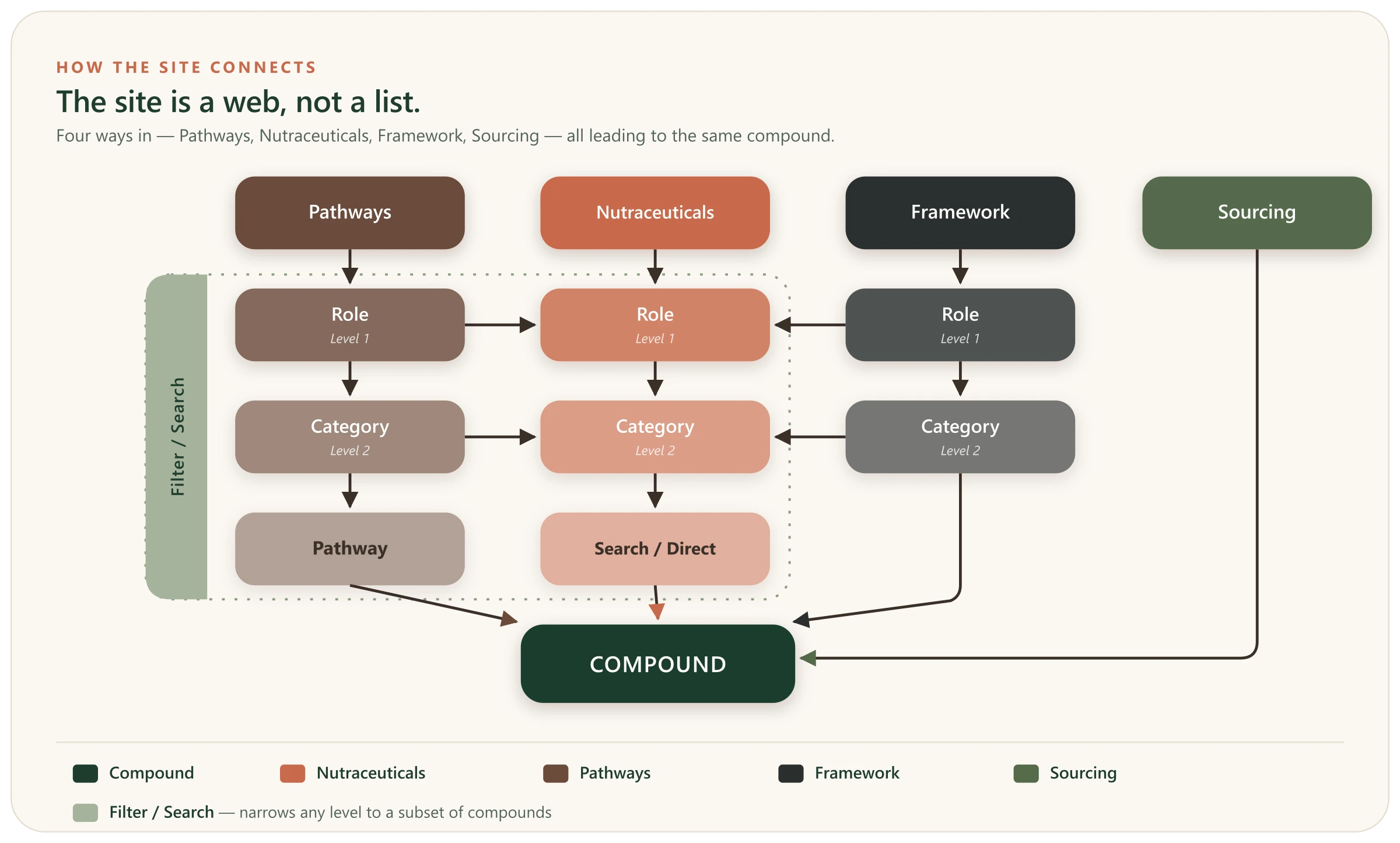
The site is a web, not a list
Mechanica Natura organises the same body of research three ways — by compound, by mechanism, or by role — and every page links onward to related research, so you can keep following a thread instead of hitting a dead end. The map below shows how the top-level pages open onto one another and all lead to the same compounds; the two maps further down zoom in, and the index at the end is a plain list of what lives where.
02 — By compound
Starting from a compound
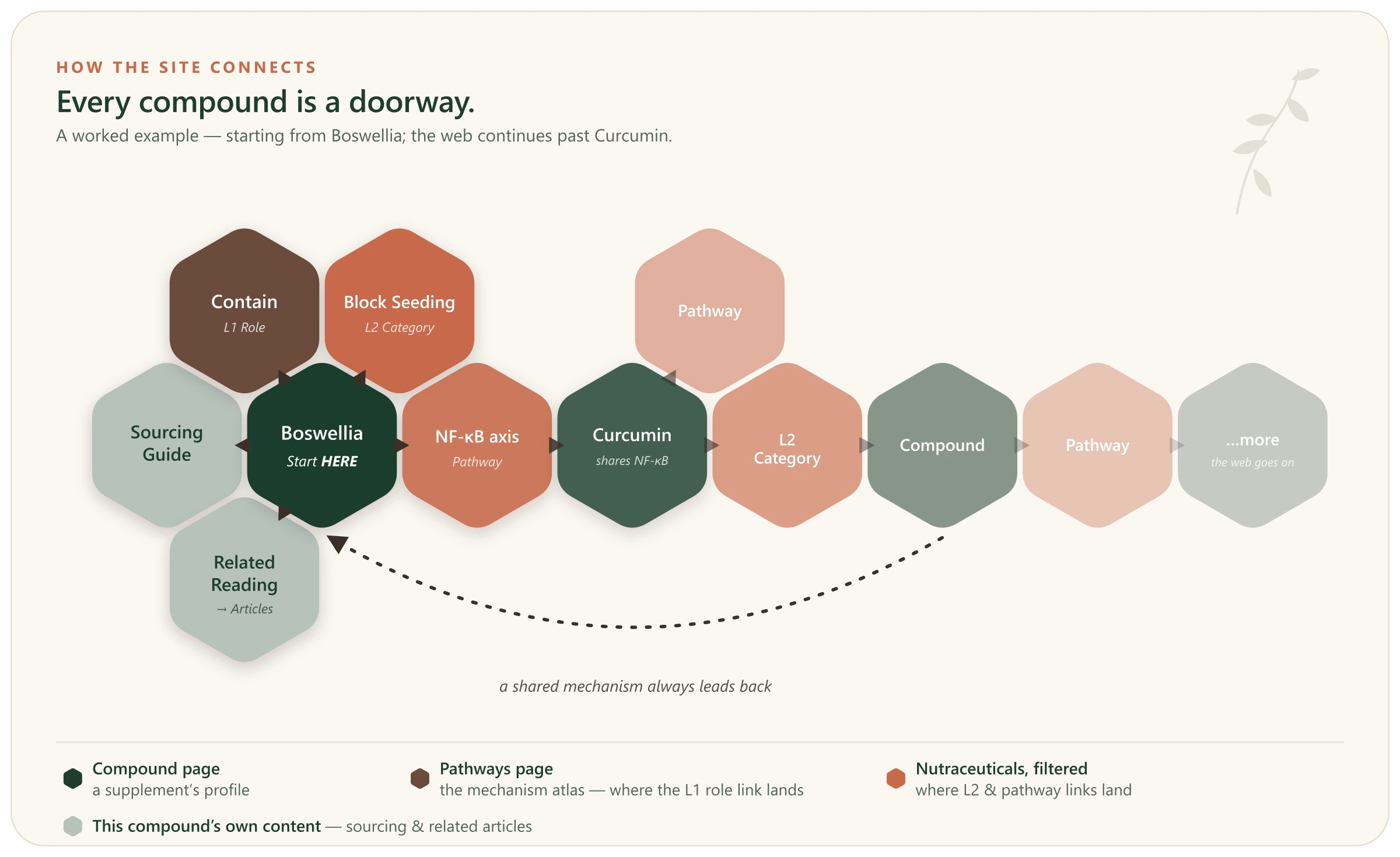
If you already have a compound in mind, its page is the hub — every link on it leads somewhere related. The map below shows the shape of those connections; the steps beneath walk through each one.
How to reach a compound’s page
There are three ways to reach a compound’s page, and any one of them works:
- Search. The Search box sits in the top-right corner of every page. Type the compound’s name and choose it from the results.
- The Compound Library. Open the Nutraceuticals page, find the compound’s card, and click through to its page.
- The Sourcing guide. Every compound listed in Sourcing has a “View Full Profile” link straight to its page.
Branching out to related compounds
Once you’re on a compound’s page, you can move sideways to related compounds:
- By a specific Pathway. In the compound’s Pathway Interaction Profile, click a Pathway’s “Also studied in →” link. This takes you to the Nutraceuticals directory, already filtered to every other compound studied in relation to that Pathway.
- By a Category / mechanism (L2). Click an L2 Category heading — for example, Block Seeding & Niche Formation. This opens Nutraceuticals filtered to every compound studied within that mechanism Category — a broader set than a single Pathway.
- By a Role (L1). On a compound’s page, the Role labels — Contain, Starve, Weaken, Attack, and Protect — link to the Pathways atlas, not the Nutraceuticals page. So to browse every compound that shares a Role (L1), the most direct route is to open Nutraceuticals and filter by Role — which is the next way to move through the site. Alternatively, simply click on the Role (L1) pill in the Pathways atlas.
03 — By pathway
Starting from a pathway
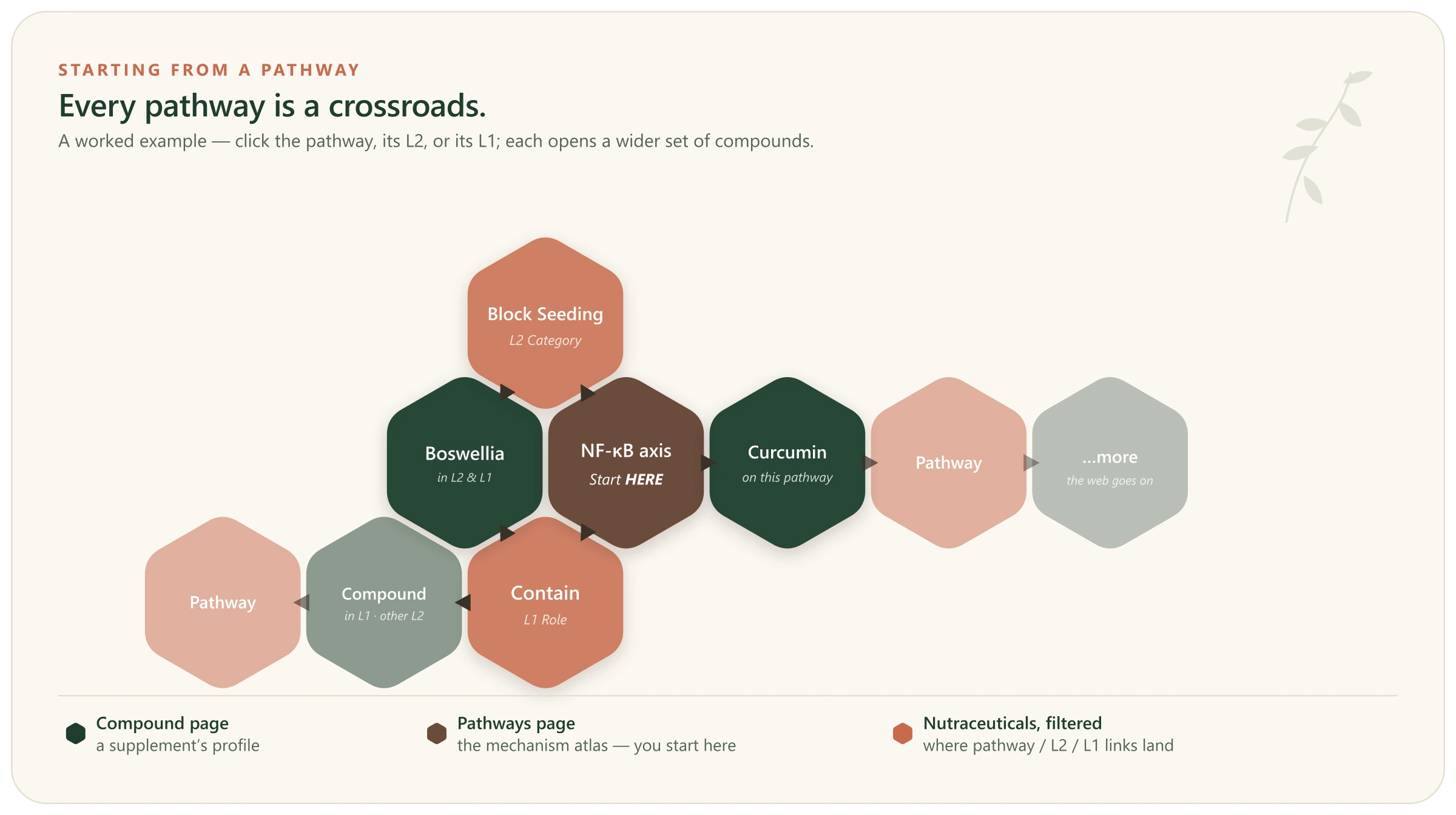
A Pathway is a crossroads where many compounds meet. The map below shows how one Pathway opens onto its compounds — and how the web continues from there; the steps beneath walk through each move.
How to reach a Pathway
Pathways don’t have their own pages — each one lives as a card on the Pathways atlas. There are two ways to get there:
- Search. Type a Pathway or mechanism term into the Search box; the results point you to the Pathways atlas and to the compounds that engage it.
- The Pathways atlas. Open Pathways from the top navigation. Every studied Pathway is listed, grouped under its Role and Category, and the sidebar lets you filter by Role to shorten the list. Find your Pathway’s card.
Moving sideways from a Pathway
A Pathway card is a jumping-off point to the compounds studied on it — and you can widen the net:
- The Pathway itself. Click the Pathway card. This opens Nutraceuticals, filtered to every compound studied on that Pathway.
- Its Category / mechanism (L2). Click the L2 Category heading. This opens Nutraceuticals filtered to every compound in that mechanism Category — a wider set than the single Pathway.
- Its Role (L1). Click the Role heading in the atlas body. This opens Nutraceuticals filtered to every compound in that Role — the widest cut. (The Role buttons in the sidebar instead filter the atlas to that Role’s Pathways, for browsing related Pathways.)
04 — By filter
Browsing the library
When you don’t have one compound or mechanism in mind — you just want to see what’s been studied for a given Role or Category — the Nutraceuticals directory is the place to browse and narrow down.
Filtering the directory
Open Nutraceuticals and use the sidebar to cut the grid down:
- By Role (L1). The sidebar lists the five Roles — Contain, Starve, Weaken, Attack, and Protect. Pick one to narrow the grid to every compound studied in that Role.
- By Category (L2). Once a Role is selected, its mechanism Categories appear beneath it. Choose one to narrow further — from a whole Role down to a single Category.
- Or Search. The Search box spans the entire library at once. Search and the sidebar filters override each other: picking a filter clears the search, and clicking “All compounds” resets everything back to the full grid.
To slice across more than one dimension at once — say, every compound with evidence in a given cancer and a given Role — the Evidence Landscape maps the whole library into one interactive grid you can filter by cancer, role, or mechanism.
From a card onward
Every card in the grid links to that compound’s full profile. Once you’re there, you’re back on a compound page — and every branch in Starting from a compound is open to you again.
05 — Just exploring
Just exploring
No particular compound or mechanism in mind? Three starting points are built for wandering rather than looking something up.
- The Home page. Lays out the whole system in one scroll — the Framework’s five Roles, the Pathways atlas, and a rotating selection from the Compound Library — each with a way in.
- Articles. Plain-language explainers on how the research actually works — evidence tiers, pharmacokinetics, what a study can and can’t show — plus a personal journal. A gentler entry than the compound profiles.
- Search. The box in the top-right corner of every page searches everything at once — compounds, Pathways, Articles, and Glossary terms. When you’re not sure where something lives, start here.
06 — Index
What lives where
A quick index of the site's main areas — all reachable from the top navigation or the footer.
- NutraceuticalsThe compound directory — the full library, filterable by role, mechanism category, or pathway.
- PathwaysThe mechanism atlas — every studied pathway, grouped under its Level 2 category and Level 1 role.
- FrameworkThe five roles — Contain, Starve, Weaken, Attack, Protect — and how compounds are classified against them.
- SourcingWhere to buy — a chosen product for each compound, with the reasoning behind the pick.
- ResourcesArticles (longer explainers), Glossary (plain-language terms), FAQ, and References (every cited source).
- LegalAbout, Medical Disclaimer, Privacy Policy, and Affiliate Disclosure.
New to how the site works? The Framework page is the methodology behind everything here — how compounds are classified into the five Roles and their Categories, how the evidence is tiered, how the Pathway lens works, and how pharmacokinetics, onset and persistence, citation standards, and formulation & sourcing are each handled. Reading it once makes the rest of the site considerably more useful.